A WhatsApp chatbot is software that receives messages sent to your business number and answers them automatically, without a person reading each one. It runs on the WhatsApp Business API — which Meta calls the WhatsApp Business Platform — not on the WhatsApp Business app. The Business app on your phone has away messages and quick replies, but it cannot connect to a chatbot: the chatbot is your own logic on a server, and Meta delivers each customer message to it through the API. UDO builds them on the API as an Official Meta Tech Provider.
That distinction matters more than it sounds. Most pages explaining chatbots show a picture of a chat bubble and move straight to features, so people buy one without knowing which parts they control, why it sometimes refuses to send, or what makes the bill move. This page answers those three things in order.
What is a WhatsApp chatbot?
An automated responder connected to your WhatsApp business number through the WhatsApp Business Platform. The customer messages you, Meta forwards it to your system, your logic decides the reply, and the reply goes back through the same connection.
- Runs on: the WhatsApp Business Platform. The Business app has away messages and quick replies, but cannot run a chatbot.
- Who starts: the customer. A bot cannot message someone unprompted — that needs opt-in and an approved template.
- What limits the reply: a 24-hour window. Inside it you answer freely; outside it, only an approved template sends.
- What it costs: replies inside that window are not billed as template messages. Messages you initiate are, by category.
The useful question is not “how clever is the WhatsApp chatbot” but “how much of my inbox is the same question twice”. If most of what arrives is order status, hours and prices, a rule-based bot answers it today. If most of it is genuinely novel, a chatbot moves the work rather than removing it.
What does a WhatsApp chatbot actually do?
It answers the questions your team answers most often — order status, opening hours, prices, booking slots — instantly, at any hour, without a person reading each message. It also collects details before handing a conversation to a human, and routes it to the right one.
- It answers instantly, at any hour. The value is rarely cleverness. It is that nobody waits until Monday for an answer that was always going to be the same.
- It collects before it hands over. Order number, city, what they actually want — gathered before a human joins, so the human starts informed.
- It routes. Sales here, support there, a returning customer to whoever handled them last.
- It fetches real answers. Connected to your systems, it can return an order status or an appointment slot rather than a canned paragraph.
- It knows when to stop. A good one hands to a person quickly. A bad one traps people in a loop, which costs more goodwill than it saves in salary.
How does a WhatsApp chatbot work?
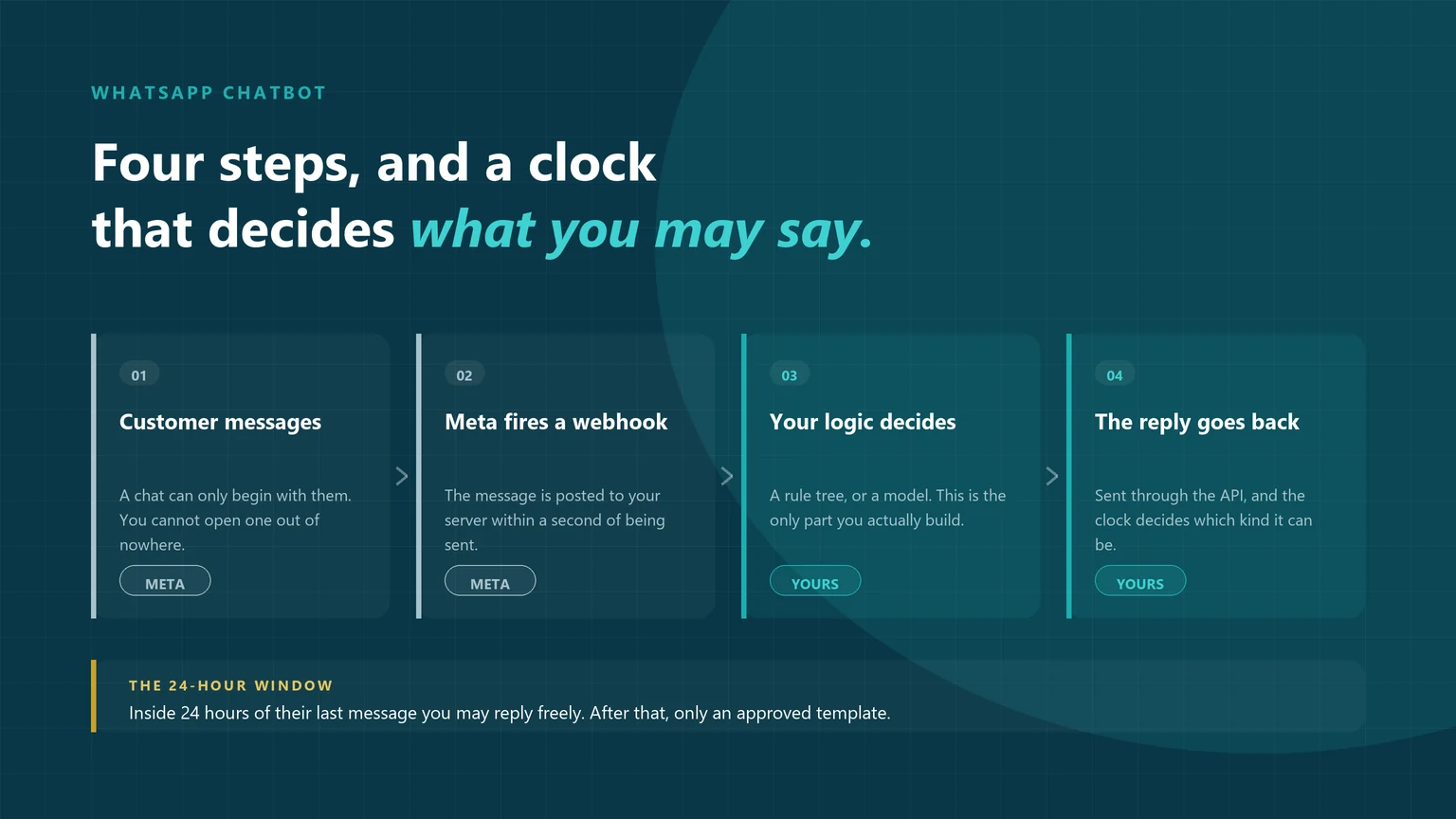
In four stages: the customer sends a message, Meta posts that message to your server as a webhook, your logic decides the reply, and your system sends the reply back through the API. Two of those stages belong to Meta and cannot be changed. The third is the only part you actually build, and knowing which is which explains almost every frustration people have with chatbots later.
The customer sends a message
This is the trigger, and on WhatsApp it is nearly always the only way a conversation can begin. Someone taps your number from an ad, a website button, a QR code or their own contact list, and types.
META’S SIDEMeta posts it to your server
Your number is registered against an HTTPS endpoint you control. The moment a message arrives, Meta sends it there as a webhook — who sent it, what it said, and when. You do not poll for messages; they are pushed to you.
META’S SIDEYour logic decides the reply
This is the chatbot. Everything else is plumbing. It may be a decision tree you drew in a visual builder, or a language model reading the message and choosing an action, or both — a tree for the common paths and a model for everything that falls off them.
YOURSThe reply is sent back
Your system calls the API to send the answer. Whether that answer can be free text or must be a pre-approved template depends entirely on how long ago the customer last wrote to you.
YOURSRead that flow again and one thing stands out: a WhatsApp chatbot never reaches out. It waits, then answers. Anything that looks like a chatbot starting a conversation is a template message sent to someone who opted in, with the bot picking up once they reply.
Why does a WhatsApp chatbot stop replying after 24 hours?
Because WhatsApp only lets you reply freely inside a rolling 24-hour customer service window, which reopens every time the customer messages you. Once it closes, the API refuses free text and only a template Meta has already approved will send.
Inside the window, your WhatsApp chatbot can reply with anything. Outside it, only an approved template will go through.
- Inside 24 hours: free-form text, images, buttons, lists — whatever your logic produces. Every new customer message restarts the clock.
- Outside 24 hours: the API refuses free text. You must send a template that Meta has already reviewed and approved.
- Templates take time. Review is not instant and they can be rejected, so a bot that depends on one written this morning may not work this afternoon.
- This is not a provider limitation. It is Meta’s rule and applies identically no matter who you buy through.
Almost every “my chatbot stopped replying” complaint is this rule. The WhatsApp chatbot works perfectly in testing, because during testing you are messaging it constantly and the window never closes. In production, a customer answers a day later and the reply silently fails. Design the conversation so the important messages land inside the window, and have an approved template ready for the ones that will not.
Rule-based or AI: which kind do you need?
There are two kinds of WhatsApp chatbot, and for most Indian businesses starting out the answer is a rule-based one — not because it is cheaper, but because rules are predictable, and a support conversation about a delayed order is not the place to discover what a model will improvise.
- Rule-based bots: follow a decision tree you drew — buttons, menus and keyword triggers, such as typing “1” for opening hours or “returns” for the returns policy. Every path is known in advance.
- AI-powered bots: use a language model to interpret ordinary human phrasing and answer from a knowledge base you supply, instead of requiring the customer to match a keyword.
| Rule-based | AI-driven | |
|---|---|---|
| How it decides | A tree you drew. Every path is known in advance. | A model reads the message and picks an intent or action. |
| Handles unexpected wording | Poorly. Anything off the tree hits a fallback. | Well. That is the whole reason to use one. |
| Predictability | Total. It cannot say something you did not write. | Lower. Needs guardrails and a review process. |
| Build effort | Hours to days, usually in a visual builder. | Weeks. It needs your content, testing and supervision. |
| Ongoing work | Edit the tree when the business changes. | Monitor answers, correct drift, keep sources current. |
| Best for | Order status, FAQs, lead qualification, routing, bookings. | Broad product questions, long catalogues, messy free-text queries. |
Most working deployments are hybrids: a tree for the paths that must never vary, a model for the long tail, and a human for anything either one flags.
If you want the longer version of this decision — including where an AI agent differs from a chatbot that merely uses AI — we have written it up separately in WhatsApp chatbot vs WhatsApp AI agent. For the broader picture of what else can run automatically on the platform, see WhatsApp automation.
What do you need before you can build one?
Four things: access to the WhatsApp Business Platform through a provider, a phone number that is not already on WhatsApp, verified business details, and recorded opt-in from anyone you intend to message first. The order matters — businesses routinely build the bot and then discover the number they wanted is not usable.
Getting through this is the part that surprises people, and it is the main thing a provider is for. We have set out what that actually involves in what a provider does and why the API needs one.
What does a WhatsApp chatbot cost to run?
Two layers: what Meta charges for the messages your business initiates, priced by category, and what your provider charges as a platform fee on top. Replies your bot sends inside the 24-hour window are not billed as template messages, so a bot that mostly answers rather than initiates is cheap to run. Conflating those two layers is why quotes from different providers look impossible to compare.
- Meta charges for messages you initiate. Template messages are priced by category — marketing, utility and authentication are not billed the same, and marketing is the most expensive of the three.
- Replies inside the service window are not billed that way. When a customer writes to you and your WhatsApp chatbot answers within 24 hours, that exchange is not charged as a template message. A bot that mostly answers rather than initiates is cheap to run.
- Your provider charges a platform fee on top. This is where quotes diverge: per message, per user, per month, minimum commitments, or a mix. Ask which, before comparing anything.
- Build cost is separate. A rule-based bot in a visual builder is largely your own time. Anything model-driven or integrated with your systems is a project.
You can see the current per-message rate for each category, and what UDO charges on top, on our WhatsApp Business API pricing page.
Want a chatbot that answers, not one that traps people?
What can a WhatsApp chatbot not do?
It cannot message people who have not opted in, cannot send free text more than 24 hours after the customer’s last message, cannot see anything else on that customer’s WhatsApp, and cannot run on the WhatsApp Business app. Every one of these is a platform rule from Meta, not a shortcoming of a particular product.
- It cannot message strangers. No opt-in, no message. A WhatsApp chatbot is not a way around that.
- It cannot send free text after 24 hours. Only an approved template, whatever your builder’s interface seems to offer.
- It cannot read other conversations. It sees messages sent to your business number, nothing else on the customer’s WhatsApp.
- It cannot rescue a bad quality rating. If people block or report you, your sending limits fall, and a faster bot makes that worse rather than better — the same signals that get accounts restricted or rejected.
- It cannot run on the Business app. Away messages and quick replies are useful, but they are not a chatbot and do not become one.
How do you set up a WhatsApp chatbot?
Get platform access and register a clean number, write the conversation before you build it, build the tree, get your templates approved early, connect the systems it needs to read from, test with people who did not build it, then launch on one entry point. Account setup is the slow part, not the bot.
- Get platform access and register the number. Your provider does the Meta-side work. Business verification runs alongside and is the usual source of delay.
- Write the conversation before you build it. On paper. What people actually ask, in the words they actually use, and what a good answer looks like. Skipping this is why so many bots feel wrong.
- Build the tree. Greeting, three or four main paths, a fallback that does not loop, and a clear route to a human at every level.
- Get your templates approved early. Anything the bot needs to send outside the window has to exist and be approved before launch, not after.
- Connect what needs connecting. Order lookup, CRM, booking system — see how the API connects to your systems. This is what separates a useful bot from an FAQ page with a chat interface.
- Test with people who did not build it. They will type things you never considered, which is the point.
- Launch narrow, then widen. One entry point, watch real conversations for a fortnight, fix the fallbacks people actually hit, then expand.
Read the transcripts in week one. Not the dashboard — the actual conversations. Every deployment we have run has had at least one obvious question the tree did not cover, and it is always visible within a few days if someone looks.
How we checked this — and what we deliberately left out
Every mechanism claim on this page — the webhook delivery, the 24-hour customer service window, template approval and categories — was checked against Meta’s own developer documentation in September 2026, not against other agencies’ blog posts. Where Meta does not publish a figure, this page does not invent one.
Two things worth being straight about:
- We have deliberately published no rupee rates here. Per-message pricing changes, and a rate copied into a dozen articles goes stale in all of them. The rates live on one page, WhatsApp Business API pricing, sourced from our pricing page. If you find a rate quoted anywhere else on this site that disagrees with those, they are the ones to trust.
- Build timelines are the part nobody can promise. We have given ranges rather than a number because account verification is Meta’s process, not ours, and it is the step that actually varies. Anyone quoting you a guaranteed go-live date is quoting the build, not the approval.
- Platform documentation: Cloud API overview, Webhooks, Message templates.
- Policy and pricing structure: WhatsApp Business Platform pricing, WhatsApp Business Messaging Policy.
- Related UDO guides: API integration, what a provider does, why accounts get rejected.
Mechanism verified against Meta’s documentation on 10 September 2026. Platform rules change; where this page and Meta’s current docs disagree, Meta is right and we would rather you told us.
Frequently asked questions
A WhatsApp chatbot is software connected to your business number through the WhatsApp Business Platform that reads incoming messages and replies automatically. When a customer messages you, Meta forwards that message to a server you control, your logic decides what the answer should be, and the answer is sent back through the same connection. It is not a setting inside WhatsApp; it is your own system sitting at the end of that connection.
No, though part of it costs less than people expect. There is no licence fee for the platform itself, and when a customer messages you and your bot answers within 24 hours, that exchange is not charged as a template message. What you pay for is messages your business initiates, priced by category, plus your provider’s platform fee and whatever the bot costs to build. A bot that mostly answers rather than initiates is inexpensive to run.
In four stages. The customer sends a message; Meta posts that message to an HTTPS endpoint registered against your number, as a webhook; your logic decides the reply, using either a decision tree or a language model; and your system calls the API to send the answer back. Two of those stages belong to Meta and cannot be changed. The third is the only part that is genuinely yours to build.
Yes. The WhatsApp Business app offers away messages and quick replies, which are useful but are not a chatbot — they cannot branch, look anything up, or hand over to a person based on what was said. Anything that decides its reply from the content of the message needs the WhatsApp Business Platform, which is arranged through a provider.
Yes, for rule-based bots. Most providers offer a visual builder where the conversation is drawn as a flow, and a straightforward support or lead-qualification bot can be built and edited by a non-developer. Coding becomes necessary when the bot has to talk to your own systems — looking up an order, checking availability, writing to a CRM — or when a language model is involved.
A WhatsApp chatbot follows a path you defined, whether that path is a rule tree or a model choosing between intents you specified. An AI agent is given a goal and some tools and decides its own sequence of steps to reach it. In practice the line blurs, and most deployments are hybrids. The practical difference is predictability: you can enumerate everything a rule-based chatbot will ever say, and you cannot do that with an agent.
Not freely. A conversation on WhatsApp is normally started by the customer. To reach out first you need prior opt-in from that person and a message template that Meta has reviewed and approved, and that message is billed by its category. Once the customer replies, the 24-hour service window opens and the bot can converse normally.
The WhatsApp chatbot is rarely the slow part. A rule-based flow for a defined use case is often a matter of days. Getting platform access, verifying the business and registering the number usually takes longer, and template approval adds time on top. Plan around the account setup rather than the build, and start template approval early.
A WhatsApp chatbot on the official platform does not put your number at risk by itself. What does is how you use it: messaging people who never opted in, sending marketing to a bought list, or ignoring a falling quality rating. Blocks and reports from recipients lower that rating, which cuts your sending limits and can eventually restrict the number. Unofficial automation tools that drive the consumer app are a separate and much larger risk.
The cost has two layers. Meta charges for the messages your business initiates, priced by template category, while replies your bot sends inside the 24-hour service window are not billed that way. On top of that your provider charges a platform fee, and the models vary widely — per message, per user, per month, or a minimum commitment. Build cost is separate again: a rule-based flow in a visual builder is mostly your own time, while anything model-driven or integrated with your systems is a project. Current per-message rates are on our WhatsApp Business API pricing page.
Get access to the WhatsApp Business Platform through a provider and register a number that is not already on WhatsApp, then write the conversation out before building it. Build the flow in your provider’s visual builder, get any templates you will need outside the 24-hour window approved early, connect the systems the bot has to read from, and test with people who did not build it. Account setup and business verification are usually the slow part, not the bot itself.
The most common cause by far is the 24-hour window. If the customer’s last message was more than 24 hours ago, a free-form reply will not send and only an approved template will. It is easy to miss in testing, where you are messaging the bot constantly and the window never closes. Other causes are a rejected or paused template, a webhook endpoint that is failing, or sending limits reduced by a low quality rating.