
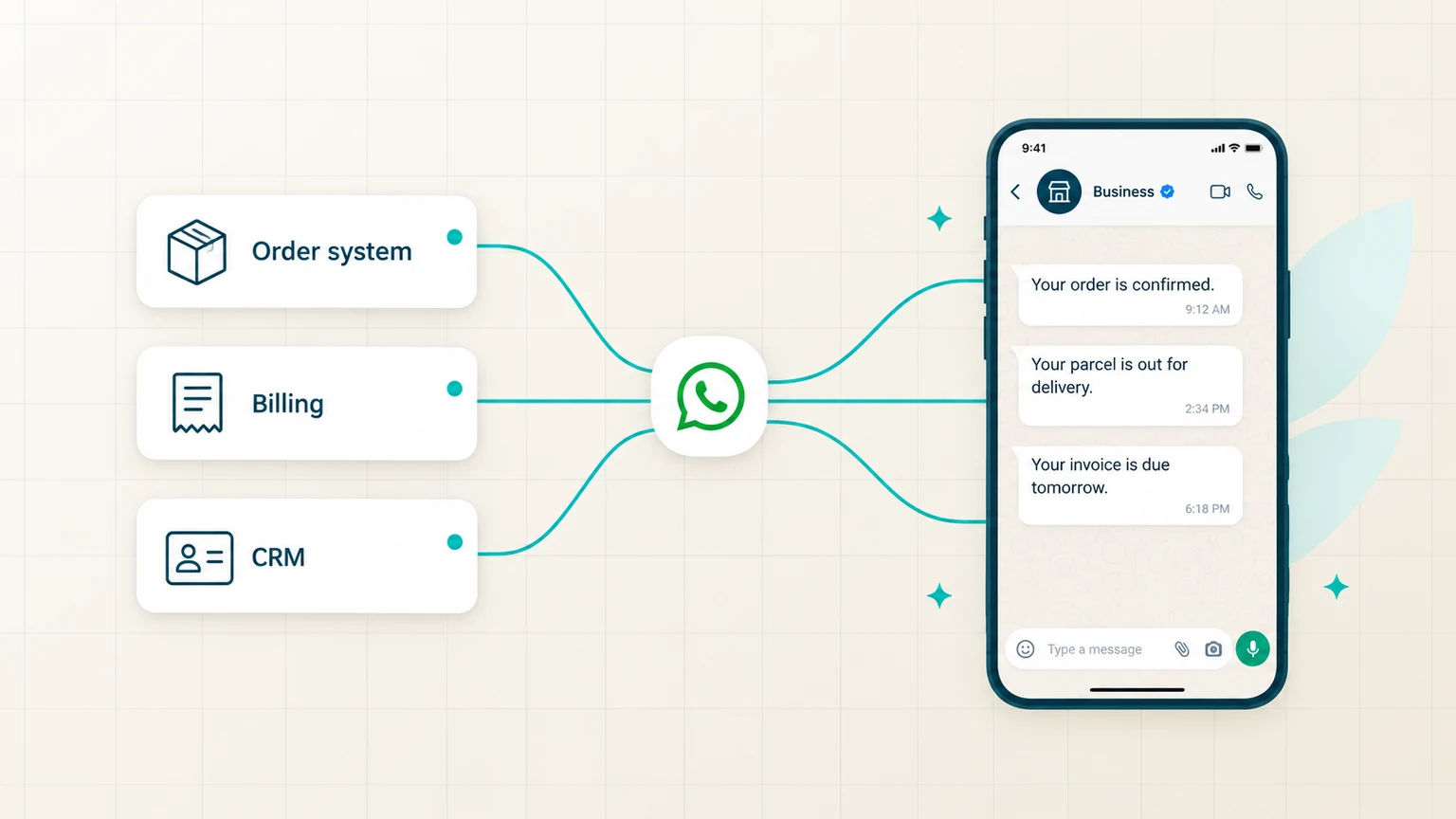
WhatsApp API integration links WhatsApp to the software your business already runs — your website, your app, your CRM, your order system. Once the two are connected, your customers hear from you automatically:
- The order is confirmed the moment it is placed.
- The parcel is on its way as soon as it ships.
- The invoice is due before anyone misses it.
Nobody has to open WhatsApp and type a word.
It is for businesses that already send customers something routinely — order updates, OTPs, reminders, invoices — and have outgrown sending it by hand. It is not for a single operator answering a handful of chats a day, who is better served by the free app.
That is what the WhatsApp Business app cannot do. It is an app on a phone, so every message waits for a person to notice something and send it. That works fine at ten messages a day, and not at all at three hundred.
What is WhatsApp API integration and why do you need it?
Integration connects your systems to WhatsApp so messages send automatically, triggered by real events — not typed by a person.
- Why you need it: the Business app is one person on one phone.
- What it needs: a verified business, a registered number, approved templates and a website.
- What it is used for: order updates, OTPs, payment reminders, cart recovery and support.
Platform facts per Meta’s documentation, read 7 September 2026.
- The Business app cannot be integrated. It is a phone app for replying by hand. Automation, CRM connections and multiple agents on one number all require the Meta Cloud API.
- A website is effectively part of the application. Meta does not publish it as a hard requirement, but business verification and display-name review lean on your public web presence, and mismatches are the most common cause of delay.
- The value is in the trigger, not the message. What makes integration worth doing is that your systems already know when something happened — integration just lets them say so.
- One number, many agents. A phone can be answered by one person. An integrated number can be handled by a whole support team with shared history.
- Verified identity comes with it. A registered, verified business displays a real business name rather than a bare phone number, which changes how messages are received.
- You do not have to build it. Verification, templates and technical setup can be handled for you — the platform underneath is identical either way.
Why do businesses need WhatsApp API integration?
Because the WhatsApp Business app cannot integrate with your systems, cannot be shared beyond one phone, cannot send at volume and cannot be measured. Those four limits are what integration removes.
It cannot talk to your systems
Your order system knows a parcel shipped. Your billing system knows an invoice is due. Neither can tell the customer, because the app has no connection to them. Someone has to notice and type it, which means it happens late or not at all.
It does not scale past one person
The app runs on a device. Two hundred conversations a day cannot be handled by one operator, and a support team cannot share a phone. Integration puts the same number in front of a whole team with shared history.
You cannot initiate at volume
Reaching thousands of customers with a delivery update or a reminder is not a manual job. Integration sends approved templates programmatically, so audience size stops being the constraint.
You cannot measure anything
The app shows you a chat. It does not show delivery rates, read rates, reply rates or which message drove a purchase. What you cannot measure, you cannot improve or justify.
| What you want to do | WhatsApp Business app | WhatsApp API |
|---|---|---|
| Send from your own systems | Not possible | Yes |
| Trigger a message from an event | Someone types it by hand | Automatic |
| Connect a CRM, order or billing system | Not possible | Yes |
| Agents on one number | One person, one device | A whole team, with shared history |
| Reach thousands at once | Not practical | Yes, with approved templates |
| Delivery and read reporting | Per chat only | Per template, across every send |
| Verified business name | Limited | Yes, after business verification |
A phone number can be active on the app or the API, never both — so this is a switch, not an addition.
It is rarely volume that forces the move. It is a specific failure — a customer who never got a delivery update and left a bad review, a payment that lapsed because the reminder sat unread in an inbox, an OTP that arrived too late to finish a checkout. Integration exists so the systems that already know things can say them.
Why is a website needed for WhatsApp API integration?
Before Meta lets you send anything, it has to confirm that your business is real and is who it claims to be. Your website is the main proof it checks, which is why a thin or mismatched site can hold up an application before anyone even looks at your messages.
- Business verification needs something to verify against. Meta checks that the business exists and that your documents, your public presence and your claimed identity all describe the same company.
- The domain backs your business email. An email on your own domain corroborates the business far better than a free mailbox, and the verification flow leans on that pairing.
- Display name review is judged against how you present publicly. The name on your messages has to plausibly be your business — and the website is where Meta sees what your business is called.
- Mismatches are the most common cause of delay. A website naming one entity, documents naming another and a display name matching neither is the classic rejection, and it costs weeks.
- Click-to-WhatsApp advertising needs a compliant destination. If ads are part of the plan, the site has to meet Meta’s advertising policies too.
- Customers check. A verified business name arrives in a chat, and the first thing a cautious customer does is look you up.
Meta’s published documentation does not list a website as a formal, hard prerequisite, and businesses have been verified without a conventional one. In practice it is the fastest and most reliable route through verification and display-name review, and applications without a coherent web presence are the ones that stall. If your site is thin, outdated or names a different entity than your registration documents, fix that before applying rather than after being rejected.
What is WhatsApp API integration used for?
It is used for order and delivery updates, OTP verification, payment reminders, appointment reminders, cart recovery and customer support — each one triggered by something your systems already know.
Order and delivery updates
Confirmation, dispatch, out for delivery and delivered, each fired by a status change. This alone removes a large share of “where is my order” contacts before they happen.
OTP and login verification
Verification codes delivered to the app the customer already has open, sent with a verified business identity so the code visibly comes from you.
Payment reminders and invoices
Due-date reminders, receipts and failed-payment notices, triggered from your billing system rather than chased by a person working through a list.
Appointments and bookings
Confirmations and reminders ahead of the slot, with the customer able to reply to reschedule — which is where no-show rates actually get addressed.
Cart recovery and re-engagement
A message when a basket is abandoned or a customer goes quiet, sent on a channel that gets opened rather than filtered into a promotions tab.
Support at volume
Inbound questions routed to a team on one number, with history attached and replies flowing into your helpdesk instead of sitting on someone’s phone.
Which of these would move the needle for you?
How WhatsApp API integration helps your business
It helps by making sure fewer deliveries fail, fewer appointments are missed, payments come in faster, messages actually get seen, and every send leaves data you can measure.
- Fewer inbound support contacts. Most “where is my order” and “has my payment gone through” questions exist only because nobody told the customer. Proactive updates remove the question rather than answer it faster.
- Messages that get seen. Notifications sent to a channel people open land differently from those competing with a full inbox or a folder of promotional SMS.
- Fewer failed deliveries and no-shows. A reminder the customer can reply to — to confirm an address or move a slot — prevents the cost rather than recovering it afterwards.
- Faster payment recovery. Reminders that arrive on time and can be acted on in the same thread close the gap between due and paid.
- A support team instead of a phone. One number handled by many agents, with history, routing, and no context lost when someone is away.
- Numbers you can act on. Delivery, read and reply rates per template, so you can see which messages work and retire the ones that do not.
- An identity customers trust. A verified business name on every message, rather than an unknown number that reads like a scam.
Most businesses expect the gain to come from campaigns and find it comes from operations. Transactional flows — order, delivery, payment, appointment — run constantly, apply to every customer, and quietly remove work from a support team every single day. Campaigns are the visible part; the notifications are the part that pays.
What a provider handles for you
A provider helps with business verification, number registration, template approval and connecting WhatsApp to your systems, so each step is done correctly.
- Business verification and display name handled end to end, including the resubmissions when Meta pushes back — the step that most often stalls a self-serve attempt.
- The technical setup — account creation, number registration and the connection to your systems — done rather than learned.
- Templates written to be approved first time and categorised as intended, instead of submitted and hoped for.
- A platform your team can use, so marketing and support send without waiting on a developer.
- Delivery reporting and quality alerts, so problems reach you as notifications rather than as next month’s numbers.
- SMS and RCS fallback on the same account, so customers WhatsApp could not reach still get the message.
How UDO helps your business grow with WhatsApp API
Unique Digital Outreach is an Official Meta Tech Provider. We handle the setup, connect WhatsApp Business API to the systems you already run, and keep your order, payment and booking messages going out reliably.
- Live sooner. Account setup, number registration, display name and business verification run for you, resubmissions included — so the channel starts working weeks before a self-serve attempt would.
- More orders completed. Delivery updates and cart-recovery messages connected to your order system, sent automatically at the moment they change the outcome.
- Payments collected faster. Reminders, receipts and failed-payment notices triggered from your billing system, arriving where customers actually read them.
- Fewer wasted slots. Appointment and booking reminders customers can reply to, so a slot gets rescheduled instead of missed.
- Campaigns that launch on time. Templates written and categorised to be approved, so a send goes out when you planned it rather than after a rejection cycle.
- Nobody missed. WhatsApp, SMS, RCS and Voice on one account, so customers WhatsApp could not reach still get the message — with named support when something stops working.
What onboarding actually looks like with us:
We check the paperwork agrees
Website, registration documents and the display name you want, compared against each other before anything is submitted. Mismatches here are the single most common cause of rejection, and they are far cheaper to fix now than after Meta says no.
We submit and chase
Business verification, number registration and display name go in together, and we handle the resubmissions when Meta comes back asking for something else.
We map flows before writing templates
Which journeys your systems can trigger, which are conversations a customer starts, and which sit inside the service window. That decides the template set and the category each one should land in.
We connect it and watch quality
Your order, billing or booking system wired to the API, then a warm opted-in segment first while the quality rating settles — because early sending behaviour sets the ceiling you live with later.
We map your flows first — which journeys your systems can trigger, which are conversations a customer starts, and which can run inside the service window where the platform does not charge at all. That decides the template set before anything is built. And if your website or documents are going to fail verification, we will tell you at the start rather than after Meta does.
Frequently asked questions
WhatsApp API integration means connecting your business software — your website, app, CRM, order system or billing system — to the WhatsApp Business Platform, so messages send automatically when something happens rather than being typed by a person. An order ships and the customer is told; a payment falls due and a reminder goes out. It is what separates the WhatsApp Business Platform from the WhatsApp Business app, which is a phone app for replying by hand and cannot be integrated at all.
Because the WhatsApp Business app has four ceilings that businesses hit quickly: it cannot integrate with the systems that know when something happened, it cannot be shared beyond one person on one device, it cannot initiate messages at volume, and it reports nothing you can measure. Integration removes all four. Your order, billing or booking system triggers the message itself, a whole support team works one number with shared history, and you get delivery, read and reply data for every template.
Meta’s published documentation does not list a website as a formal hard requirement, and businesses have been verified without a conventional one. In practice it is close to essential. Business verification and display-name review need evidence that your business is real and is what it claims to be, and your website plus a business email on your own domain is the primary evidence Meta uses. Mismatches between your site, your registration documents and your intended display name are the most common cause of rejection and delay.
Six patterns cover most real usage: order and delivery updates fired by a status change; OTP and login verification; payment reminders, receipts and failed-payment notices from a billing system; appointment confirmations and reminders customers can reply to; cart recovery and re-engagement messages; and inbound customer support handled by a team on a single number with history attached. Each is triggered by something your systems already know.
It removes inbound support contacts rather than answering them faster, because most “where is my order” questions exist only because nobody told the customer. It reduces failed deliveries and no-shows through reminders customers can reply to, speeds up payment recovery, lets a support team share one number instead of a phone, and produces delivery and read data per template so you can see which messages work. Most of the return comes from everyday transactional flows rather than from campaigns.
The WhatsApp Business app is a free mobile app for a person replying to customers by hand, suitable for a small business with one operator. The API is for software to send and receive messages automatically and at volume, with approved templates, multiple agents on one number and reporting. A phone number can be active on one or the other, never both, so moving a number to the API takes it out of the app permanently and deletes that chat history.
Not necessarily. Building directly on Meta’s platform does require engineering. Through a provider, the account setup, verification and connection work is handled, and non-technical teams send from an interface. Developers are still useful if you want messages triggered from a custom in-house system, and providers expose an API for exactly that, so the two are not mutually exclusive. What you are really choosing is how much of the plumbing you want to own.
Only if you remove it from WhatsApp first. A number can be active on the WhatsApp app, the WhatsApp Business app or the API — never more than one at a time. Migrating an existing business number deletes its WhatsApp chat history and takes it out of the Business app permanently. If a team is currently answering customers on that number by hand, plan the switch deliberately, or register a new number and move traffic across gradually.
Days rather than hours, and the delay is almost never technical. Business verification and message template review are what set the timeline, and both take longer if documents are mismatched or a template is rejected and needs rewriting. Getting your website, registration documents and intended display name to agree with each other before applying is the single biggest thing you can do to shorten it.
No — any business can go direct to Meta, and engineering teams embedding messaging inside their own product often should. A provider is worth it when you would rather not own the verification process, template approvals, technical setup and monitoring, when non-technical teams need to send without filing a ticket, or when you want SMS and RCS fallback for customers WhatsApp did not reach. The platform underneath is identical either way.
Would integration actually pay for your business?
Tell us what your systems already know — orders, payments, bookings — and we will show you which flows would run on WhatsApp, and what that changes. Verification and setup handled from there.