
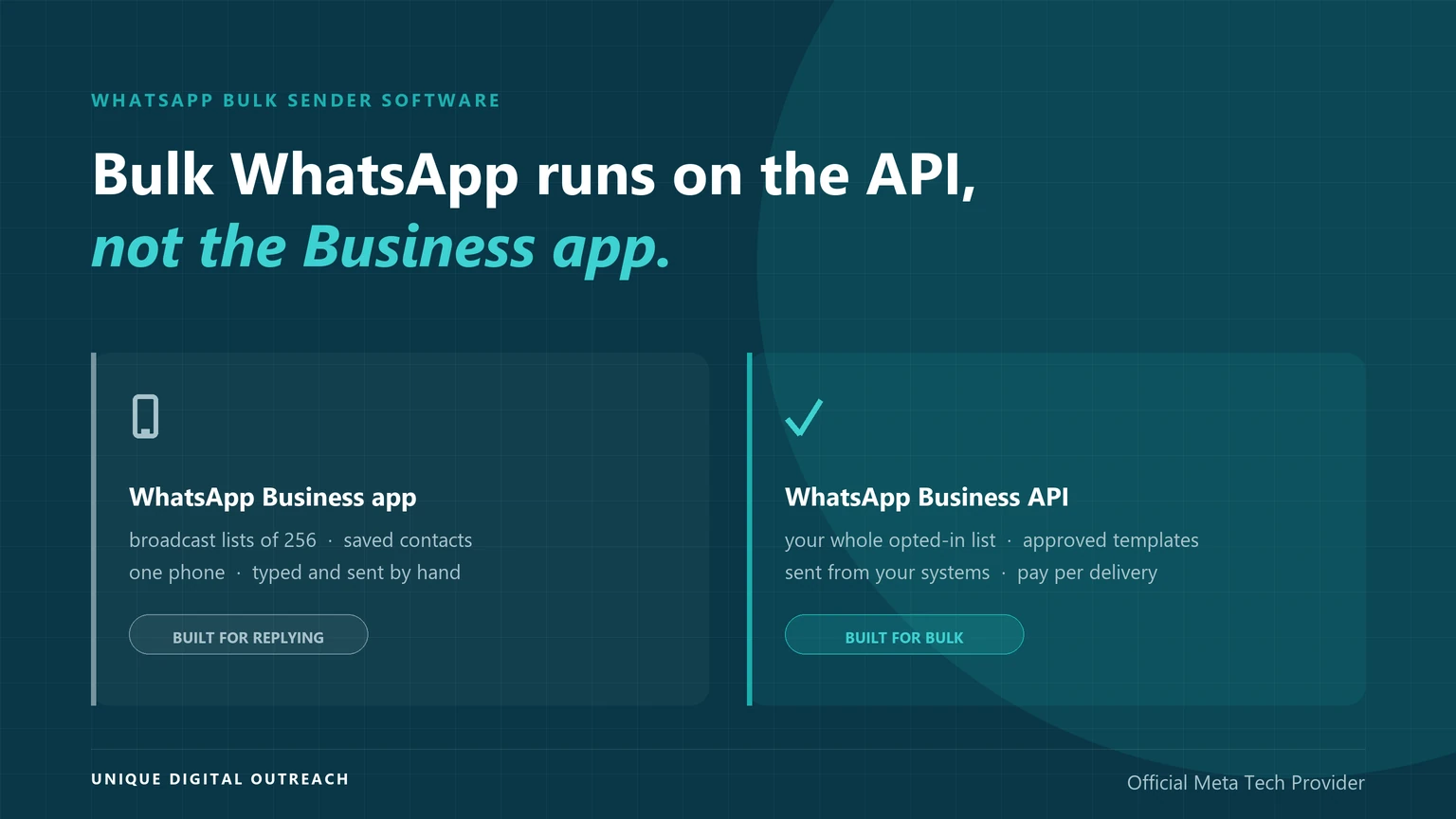
WhatsApp bulk sender software is a platform that sends one message to many customers at once, and UDO provides one, built on the WhatsApp Business API. The API is the connection Meta gives businesses for sending at volume: Meta-approved templates, an opted-in list, a daily limit that rises as quality holds, and a delivery receipt for every message. The WhatsApp Business app — the free app on your phone — was built for a person replying to customers, and it runs out long before a campaign does.
UDO’s platform comes with no licence fee and no monthly plan: you pay per delivered message, and anything that fails to arrive is not billed.
What is the best way to send bulk WhatsApp messages?
The best way to send bulk WhatsApp messages is WhatsApp bulk sender software built on the WhatsApp Business API, such as the platform UDO provides. The WhatsApp Business app is built for replying to customers, not for sending to thousands of them.
- Best for bulk campaigns and alerts: the WhatsApp Business API through UDO’s platform — approved templates to your whole opted-in list, sent from one easy dashboard, billed only when delivered.
- Best for one person replying by hand: the WhatsApp Business app — free, but its broadcast lists stop at 256 contacts who have saved your number.
- Best when WhatsApp cannot reach someone: bulk SMS as an automatic fallback — it works on feature phones and without mobile data.
- Never for bulk: unofficial sender tools — they automate WhatsApp Web on your phone, break WhatsApp’s terms and end with the number banned.
Can the WhatsApp Business app send bulk messages?
Not at campaign scale: the WhatsApp Business app’s free broadcast lists reach at most 256 contacts per list, and only people who have saved your number in their phone receive the message.
The app also has a paid option — business broadcasts, launched in India as customised marketing messages — charged per delivered message and able to carry a customer’s name and a button. They are still written and sent by hand, from the app, on one phone. Nothing in your CRM, online store or billing system can trigger them. That is the real line between the two products, and it is why WhatsApp bulk sender software — including the platform UDO provides — is built on the API instead.
| What matters for bulk | WhatsApp Business app | WhatsApp Business API |
|---|---|---|
| Built for | One person replying to customers from a phone | A business sending from its own systems at volume |
| Reach per send | 256 contacts per free broadcast list | Your whole opted-in list, within your daily limit |
| Recipient must save your number | Yes, for free broadcast lists | No — opt-in is what counts |
| Daily ceiling | Whatever one person can send by hand | 250 unique customers, rising automatically to unlimited |
| How a send starts | Typed and sent from the app | Triggered by your CRM, store or order system, or scheduled from a dashboard |
| Personalisation | A name on paid broadcasts; none on free lists | Any variable per recipient: name, order number, due date, amount |
| Team access | One phone plus linked devices | Many agents and systems on the same number |
| Delivery reporting | Ticks inside each chat | Sent, delivered, read or failed for every message, returned to your systems |
| Connects to your CRM | No | Yes — that is what an API is for |
| Cost | App free; business broadcasts paid per message | Per delivered message by category; with UDO, no platform fee |
- WhatsApp Business app: free broadcast lists of 256 saved contacts, paid broadcasts sent by hand, one phone.
- WhatsApp Business API: templates to your whole opted-in list, triggered from your CRM, with a limit that climbs to unlimited.
- Unofficial sender software: neither — it drives the app or WhatsApp Web without permission, and the number gets banned.
How does the WhatsApp Business API send bulk messages?
The WhatsApp Business API sends bulk messages by delivering one Meta-approved template to many opted-in customers in a single campaign, with each copy personalised and each delivery tracked.
That is all a “bulk WhatsApp API” is: Meta does not sell a separate bulk product. WhatsApp bulk sender software, such as UDO’s platform, is the campaign screen built on top of the Business API. Four parts make it work, and the Business app has none of them.
Templates
Any message you start is a template Meta has reviewed. Variables fill in the name, order number or date for each person, so ten thousand copies can each read differently.
Opt-in
You message people who agreed to hear from you on WhatsApp. They do not need your number saved; they need to have said yes, and you need a record of where.
Messaging limits
Meta sets how many unique customers you can reach in 24 hours. It starts at 250 and rises automatically while people keep reading rather than blocking.
Delivery receipts
Every message reports back as sent, delivered, read or failed. That is what lets a provider bill only for delivered messages, and lets you retry or fall back to SMS.
How many messages can the WhatsApp Business API send per day?
A new business on the WhatsApp Business API can message 250 unique customers in a rolling 24 hours, and the limit rises to 2,000, 10,000, 100,000 and then unlimited as quality holds.
| Tier | Unique customers per 24 hours | How you reach it |
|---|---|---|
| Starting | 250 | Default for every new business portfolio |
| Tier 2 | 2,000 | Verify the business, have a partner verify it, or deliver 2,000 template messages to unique customers in 30 days at high quality |
| Tier 3 | 10,000 | Automatic within 6 hours, once you use at least half your current limit over 7 days at good quality |
| Tier 4 | 100,000 | Same automatic progression |
| Tier 5 | Unlimited | Same automatic progression |
The limit counts people, not messages — three messages to one customer use one slot — and it is set for the whole business portfolio, shared by every number in it. The app has nothing to climb: each free broadcast list is 256 contacts, and the next list is sent by hand.
How do you send bulk WhatsApp messages through the API?
The easiest way to send bulk WhatsApp messages through the API is on UDO’s platform: create an account, let UDO handle Meta’s approvals, upload an opted-in list, and launch — paying only for the messages that are delivered.
UDO’s platform is WhatsApp bulk sender software built on the Business API. It runs in a web dashboard, so there is nothing to install and no coding needed, and there is no licence, setup fee or monthly subscription. Six steps take you from sign-up to your first campaign:
- Create your UDO account. Fill in your details and the UDO team gets in touch to set you up — or book a demo to see the dashboard first.
- Connect your number. A fresh number is simplest, and an existing WhatsApp Business app number can move across too.
- Let UDO handle Meta’s approvals. Business verification, display-name approval and template reviews are submitted for you. Verification is also the quickest way off Meta’s 250-customer starting limit.
- Write your message as a template. Add the customer’s name, order number or date as variables so every copy is personal. Anything you send first, or more than 24 hours after a customer last wrote to you, has to go out as a Meta-approved template.
- Upload an opted-in list, or connect your CRM. Upload a file, or sync contacts from your CRM — Salesforce, HubSpot, Zoho, Freshdesk, CleverTap, MoEngage or your own. Recipients do not need your number saved; they need to have agreed to hear from you.
- Launch and track. Send now or schedule it, then watch delivered, read and failed counts in the delivery report. You pay only for messages that are delivered — failed ones are not billed — and keeping block and report rates low lets your sending limit keep climbing.
Opt-in is the step most people skip, and it decides whether bulk sending works. An approved template sent to a list that never asked for it still gets blocked and reported. The API reacts to that by lowering your quality rating, pausing templates and shrinking your limit. Compliance is not only about how you send; it is about who you send to.
Can you connect your own CRM to the WhatsApp Business API?
Yes: you can connect any CRM to the WhatsApp Business API, so WhatsApp messages go out automatically when a lead, order or payment changes, and delivery updates and replies come back to your team.
UDO’s platform integrates with Salesforce, HubSpot, Zoho and Freshdesk, has ready-made connections for CleverTap and MoEngage, and connects custom or in-house CRMs through its REST API. Customer data and conversation history sync automatically, so your team always has the full context. It is also the clearest line between WhatsApp bulk sender software built on the API and the Business app, which cannot be connected to a CRM at all.
- Get your credentials from UDO. Your API key is in the UDO dashboard; for MoEngage, the UDO team issues a bearer token. Keep credit in your account — a correctly set-up connection still fails on an empty balance.
- Connect UDO to your CRM. CleverTap and MoEngage are set up from their own settings screens, with no developer and no code change. Salesforce, HubSpot, Zoho, Freshdesk and custom CRMs connect via UDO’s REST API.
- Keep your journeys as they are. Your segments, triggers and personalisation stay in the CRM. It decides when to send and fills in each template’s name, order or date, and UDO carries the message.
- Send UDO your callback URL. It carries delivery receipts and customer replies back into your CRM. Without it, messages still go out but nothing reports back.
- Test, then go live. Send a test message to your own number, check that it arrives and reports back, then switch your campaigns over.
Using a CRM not listed here? Tell UDO which platform you use and the team will look at what connecting it would take. Full setup instructions for CleverTap and MoEngage are in our CRM integrations guide, and the WhatsApp API integration guide covers which journeys to connect first.
Why not use unofficial WhatsApp bulk sender software?
Unofficial WhatsApp bulk sender software automates WhatsApp Web or the app on your own phone, which breaks WhatsApp’s Business Terms and usually ends with the number restricted, then banned.
These tools exist because the app cannot send in bulk and the API asks for verification and templates. They skip both by imitating a person typing very fast. Any one of these tells gives one away:
- It asks you to scan a QR code with your phone. That is WhatsApp Web linking. The API never needs your personal phone.
- There is no template approval step. On the API, a message you start must use a template Meta has reviewed.
- It is a desktop download or a browser extension. The API is a server connection with a web dashboard in front of it.
- It sells unlimited sending for a flat fee. Meta charges for every delivered API template, so unlimited-for-a-flat-fee means Meta is not in the loop.
When the ban lands, the chat history, the business profile and every customer who still has that number saved go with it. We cover the appeal process in why Meta bans WhatsApp numbers and how to recover.
What does bulk WhatsApp messaging cost on the API?
Bulk WhatsApp messaging on the API costs one charge per delivered message, priced by template category, and with UDO nothing else: no licence, no setup fee and no monthly subscription.
Campaign cost = delivered messages × the per-message rate for the template’s category
- Category sets the rate. Meta prices marketing, utility and authentication templates differently, and marketing costs the most.
- Replies are free. Free-form replies inside the 24-hour window after a customer writes to you are not charged, and neither are utility templates sent inside that window.
- Per message since 1 July 2025. Meta replaced conversation-based pricing, so any guide quoting a price per conversation or a monthly free allowance is out of date.
- The provider fee is where bills differ. Most Indian providers add a monthly platform fee whether you send or not. UDO does not.
You can see the current per-message rate for marketing, utility and authentication messages on our WhatsApp Business API pricing guide.
The Business app looks cheaper than WhatsApp bulk sender software like UDO’s platform, because it is free. What that price leaves out is the ceiling: 256 saved contacts per list, sent by hand, with no delivery report to tell you who actually received it.
Is bulk WhatsApp software the same as bulk SMS software?
No: bulk WhatsApp software sends through Meta’s WhatsApp Business API over the internet, while bulk SMS software sends over mobile networks and, in India, needs DLT registration first.
“WhatsApp bulk SMS software” is one of the most searched phrases in this market because many businesses say “bulk SMS” for any mass messaging. What they want is a platform that sends WhatsApp at volume, like UDO’s on the Business API — not an SMS gateway.
- Bulk SMS runs over the mobile network. In India it needs DLT registration with your telecom operator, and both the sender ID and the message template are registered before you can send.
- Bulk WhatsApp runs over the internet through Meta. It needs Meta-approved templates and an opted-in list instead, and it carries images, buttons and PDFs that SMS cannot.
- They work best together. WhatsApp first for the richer message, SMS as the fallback when WhatsApp does not deliver — SMS reaches feature phones and needs no internet connection.
If SMS is what you need, our bulk SMS service covers the DLT side, and DLT registration explained walks through what the operators require.
Why use UDO’s platform to send bulk WhatsApp messages?
Use UDO’s platform because it is easy-to-use WhatsApp bulk sender software on the official WhatsApp Business API, run by an Official Meta Tech Provider, and you pay only for the messages that are delivered — with no licence, setup fee or monthly plan.
- Easy to use. A web dashboard with nothing to install and no coding: upload a list, choose a template, then send or schedule.
- Pay only for delivered messages. No licence, no setup fee and no monthly minimum. Failed messages are not billed, and a quiet month costs nothing.
- CRM connection. Salesforce, HubSpot, Zoho, Freshdesk, CleverTap, MoEngage or a custom CRM through the REST API, so messages go out when something changes in your CRM — or upload a list and schedule a campaign from the dashboard. How the CRM connection works.
- Meta approvals handled. Business verification, display-name approval and template submissions are done for you.
- Smart fallback to SMS. When WhatsApp does not deliver, the message can fall back to SMS automatically, and you are charged only for the channel that worked.
- One dashboard for WhatsApp, SMS and RCS, with real delivery reporting rather than a “sent” count.
Send your next campaign from UDO’s platform
Frequently asked questions
WhatsApp bulk sender software is a platform for sending one message to many customers at once. UDO provides one: its platform is built on the WhatsApp Business API, which Meta provides to businesses for sending approved templates to opted-in customers at volume. The same term is also used for unofficial tools that automate WhatsApp Web or the app on a personal phone; those break WhatsApp’s Business Terms and end with the number banned.
Only on a small scale. Free broadcast lists in the WhatsApp Business app hold up to 256 contacts each, and only contacts who have saved your number receive the message. The app also offers paid business broadcasts, charged per delivered message, but they are written and sent by hand from one phone and cannot be triggered by your other systems. For campaigns to thousands of customers, alerts from an order system, or personalised messages at volume, you need the WhatsApp Business API.
The app is a free phone application for a person replying to customers by hand. The API is an interface your systems connect to: it sends Meta-approved templates to your whole opted-in list, lets many agents work one number, reports delivery for every message, and carries a daily limit that climbs from 250 unique customers to unlimited. The app cannot be connected to other software; the API exists for exactly that.
A new business can message 250 unique customers in a rolling 24 hours. Verifying the business moves it to 2,000, and from there the limit rises automatically to 10,000, 100,000 and unlimited while quality stays high and you use at least half your current limit over seven days. The limit counts unique customers, not messages, and it is shared by every number in your business portfolio.
Not on the API. Free broadcast lists in the WhatsApp Business app only reach people who have saved your number, which is the main reason they fail as a bulk channel. On the WhatsApp Business API what matters is opt-in: the customer agreed to receive WhatsApp messages from you, and you can show where and when that permission was given.
Yes. You can move the number to the API entirely, or connect it through Meta’s coexistence option and keep using the app for one-to-one chats on the same number. On coexistence the app’s broadcast lists are switched off, bulk sending moves to the API, and the number’s throughput is fixed at 20 messages per second.
Yes. Any CRM can be connected to the WhatsApp Business API, so messages go out automatically when a lead, order or payment changes and delivery updates and replies come back to your team. UDO’s platform integrates with Salesforce, HubSpot, Zoho and Freshdesk, has ready-made connections for CleverTap and MoEngage, and connects custom CRMs through its REST API, with customer data and conversation history syncing automatically. The WhatsApp Business app cannot be connected to a CRM at all.
Unofficial WhatsApp bulk sender software very likely will. WhatsApp detects automation patterns — high volume from a personal number, repeated identical text, messages to people who never opted in — and moves from a temporary restriction to a permanent ban. On the WhatsApp Business API the risk is different and manageable: sending to people who block or report you lowers your quality rating, which pauses templates and reduces your limit. Opt-in is what keeps an API number healthy.
No. Bulk SMS runs over the mobile network and, in India, requires DLT registration of both your sender ID and your message templates with the telecom operators. Bulk WhatsApp runs over the internet through Meta’s WhatsApp Business API and requires Meta-approved templates and customer opt-in instead. Many Indian businesses use “bulk SMS” loosely to mean any mass messaging, which is why the terms get mixed up. The two work well together, with SMS as the fallback when WhatsApp does not deliver.
You pay per delivered message and nothing else — no licence fee for UDO’s platform, no setup fee and no monthly subscription — and messages that fail to deliver are not billed. Meta prices templates by category, with marketing, utility and authentication charged at different rates; the current figures are on our pricing page. Most Indian providers add a monthly platform fee on top of the per-message rate, which is the charge UDO does not have.