
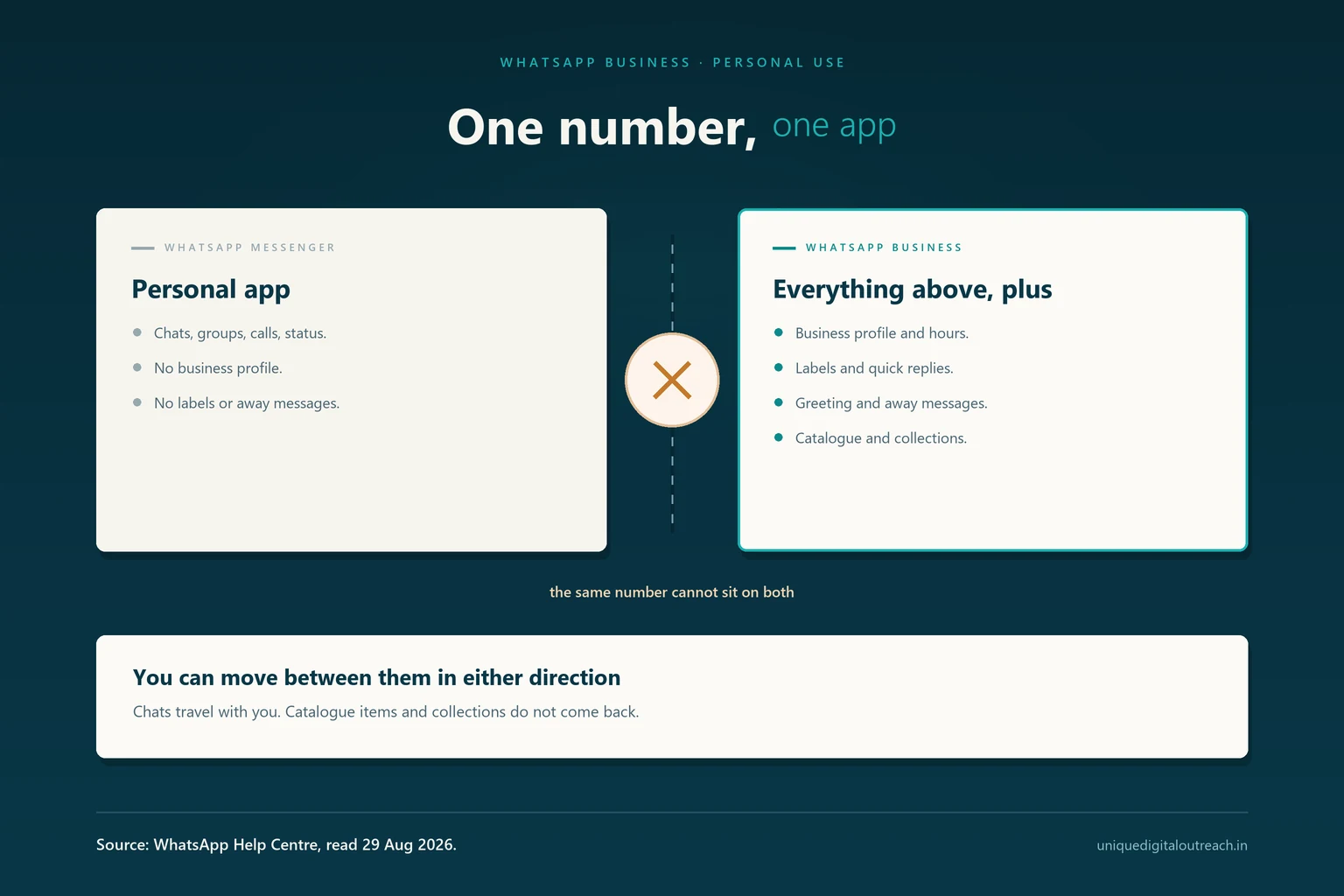
Yes, you can use the WhatsApp Business app for personal messaging. WhatsApp describes it as “intended to feel and work just like WhatsApp Messenger”, and says you can use it to do everything you are used to doing, from messaging to sending photos. Nothing in the app blocks personal chats and no rule prohibits them.
The real constraints are practical rather than permissive, and there are three of them.
One phone number cannot be registered on both apps simultaneously. A business profile makes some details visible that a personal account does not show. And if you ever move back, the business-only features do not come with you.
This guide covers each, using WhatsApp’s own Help Centre as the source.
Can I use the WhatsApp Business app for personal chats?
The short version
Yes. The WhatsApp Business app is a complete messenger and handles personal chats exactly as WhatsApp Messenger does.
- Allowed? Yes. It is a free app on Android and iPhone, and personal messaging works normally.
- Same number on both apps? No. WhatsApp states you cannot use one phone number with each app at the same time.
- Both apps on one phone? Yes, with two different numbers.
- Can you move back? Yes, but catalogue items and collections do not transfer.
- Does WhatsApp recommend it? No. It says that if you are not a business, there is no need to download the separate app.
Source: WhatsApp Help Centre, read 29 August 2026.
- Nothing prevents personal use. The Business app is a superset of the regular one, so every personal messaging feature is present.
- One number, one app, always. This is the constraint that catches people out, and it has no workaround.
- You need a second number to run both apps on the same phone — a dual-SIM handset or a second line.
- Switching is reversible, but business-only data such as catalogue items and collections is lost on the way back.
- A business profile is public-facing in a way a personal profile is not, which is the part most people do not think about first.
- WhatsApp’s own advice is that non-businesses do not need the app — useful to know, though it is guidance rather than a restriction.
Can the same number be on WhatsApp and WhatsApp Business?
No. This is the single most important thing to understand, and it is stated plainly by WhatsApp: the two are different apps, and you cannot use the same phone number with each simultaneously.
What that means in practice is that your number lives in one app at a time. Register it on the Business app and it leaves WhatsApp Messenger. Move it back and it leaves the Business app.
There is no setting that splits personal and business chats across the two apps on one number, and no third-party tool that legitimately achieves it. Anything advertising that capability is worth treating with suspicion.
Moving between the apps is supported and straightforward in both directions, which is the part that makes this workable.
Why there is no workaround
Before you switch either way
Before switching either way, take a local or cloud backup. Migration between the apps is designed to carry your chats across, but a backup is the difference between a routine switch and losing years of conversation because something went wrong mid-way. Do it even when the move looks trivial.
What actually changes if you switch?
Less than most people expect on the messaging side, and more than they expect on the profile side.
Four things that change, and one that does not
Messaging is identical
Chats, groups, voice notes, calls, photos, status, disappearing messages and end-to-end encryption all behave exactly as they do on WhatsApp Messenger.
You gain a business profile
A profile that can carry an address, email, website and hours. Optional to fill in, and a step towards a verified business account if you ever want one.
You gain organising tools
Labels to sort contacts and chats, plus quick replies, greeting messages and away messages. Genuinely useful even for a busy personal account.
You gain a catalogue
A product catalogue and collections you will probably never use personally — and the one thing that will not survive a move back to WhatsApp Messenger.
WhatsApp Messenger vs Business app vs API
Three products, constantly confused with one another. Only the middle one is in question here.
| WhatsApp Messenger | WhatsApp Business app | WhatsApp Business API | |
|---|---|---|---|
| Works for personal chats | Yes | Yes | No — there is no app to open. |
| Cost | Free | Free | Paid, through a provider. |
| Where you use it | Phone app | Phone app | Your own systems. |
| Business profile | No | Yes — address, email, website, hours. | Yes. |
| Labels and quick replies | No | Yes | Through your provider’s tools. |
| Greeting and away messages | No | Yes | Yes, plus full automation. |
| Catalogue and collections | No | Yes | Yes. |
| People answering one number | One | One | A whole team. |
| Broadcast limit | 256 per list | 256 per list | No list cap. |
| Built for | Individuals | Small businesses and solo traders | Teams sending at volume. |
The first two columns are the real choice for anyone asking this question. The API is listed only because it is so often confused with the app — it is not a messenger and cannot be used for personal chats.
Can I run both apps on one phone?
Yes, with two different phone numbers. This is how most freelancers and solo traders actually run things, and it is the arrangement WhatsApp itself points to.
Install WhatsApp Messenger with your personal number and the WhatsApp Business app — free on Google Play and the App Store — with a second one. Both sit on the same handset as separate apps with separate chat lists, separate notifications and separate backups.
A dual-SIM phone makes this straightforward. A second number on an eSIM or a spare line works equally well — the requirement is simply that the number can receive the verification code once.
The practical benefit is separation. Work chats stop arriving in the middle of family conversations, and you can leave the business app closed in the evening without going silent to everyone you know.
What do your contacts see?
This is the part worth thinking about before you switch a personal number.
A business account presents differently. Anything you enter in the business profile — address, email, website, hours, business description — is visible to people who open your profile. On a personal account, none of those fields exist.
None of this exposes your messages. End-to-end encryption is unchanged and the Business app is no less private in that respect. The difference is presentational: a business account is designed to tell people something about you, and a personal account is not.
Exactly what a business profile can show
- Business name — shown instead of, or alongside, your own name.
- Address — a street address, with a map location if you set one.
- Business description — a short line describing what you do.
- Business hours — the days and times you list as open.
- Email address and website — both tappable from your profile.
- Category — the business type you pick during setup.
None of these fields exists on a personal account, and every one is optional. Anyone who opens your profile sees whichever you have filled in — there is no setting that shows them to customers but hides them from friends.
How to keep your profile private
Leave the business profile fields empty and the account reveals nothing extra. Fill them in and everyone who opens your profile — friends and family included — sees your address, email and hours. If you are switching a personal number purely for the labels and quick replies, just do not complete the profile.
Can I switch back to WhatsApp Messenger?
Yes. WhatsApp supports moving in both directions, so the decision is not permanent.
One caveat matters, and it is stated in WhatsApp’s own documentation: while some account information moves across, WhatsApp Business app features do not. Information tied to business-only features, such as catalogue items and collections, cannot be transferred.
For someone using the app personally that is nearly irrelevant — you were not maintaining a catalogue anyway. For a small trader who has built one, it means exporting anything worth keeping before moving back.
Chats are the thing people actually worry about, and those are what the migration is built to carry. Take a backup regardless.
What to do before you switch
- Back up your chats — local or cloud, whichever you already use. Do this even for a switch that looks trivial.
- Decide which number goes where. Once your number moves, it leaves the other app until you move it back.
- Get the second number ready if you want both apps side by side. It only needs to receive one verification code.
- Export your catalogue if you built one and are moving back to WhatsApp Messenger, because it will not survive the move.
- Leave the business profile blank if you are switching only for the labels and away messages.
Should you use the Business app personally?
WhatsApp’s own position is that if you are not a business, there is no need for the separate app. That is guidance rather than a rule, and there are reasonable cases on both sides.
Which app suits you
- You only message friends and family
- You would rather your profile said nothing about you
- You have one number and no reason to complicate it
- You do not need labels, away messages or quick replies
- You sell something, even occasionally or as a side venture
- You want away messages so people are not left waiting
- Labels would help you find conversations you keep losing
- You want a second, clearly separate number for work
Where the WhatsApp Business API is different
Worth clearing up, because these get conflated constantly. There are three WhatsApp products, not two.
WhatsApp Messenger is the personal app. The WhatsApp Business app is the free small-business app this article is about — a full messenger with extra tools. The WhatsApp Business API is something else entirely.
The API has no app to open. There is no chat list on your phone and no personal messaging, because it is infrastructure that connects WhatsApp to your own systems through an authorised Business Solution Provider. It exists for teams sending at volume, running automation or a chatbot or AI agent, or handling one number across several agents.
So the API is never the answer to a personal-use question. It becomes relevant only when the Business app runs out of room — usually when more than one person needs to answer the same number, or when you start sending order updates automatically.
When one phone stops being enough
When the app stops being enough
Where these answers come from
Both are WhatsApp’s own Help Centre, read on 29 August 2026. WhatsApp changes app behaviour without notice, so re-check anything critical.
Two WhatsApp Help Centre pages, read 29 August 2026
- WhatsApp — About WhatsApp Business — that the app is free on Android and iPhone, is intended to feel and work just like WhatsApp Messenger, and that non-businesses have no need to download it. faq.whatsapp.com.
- WhatsApp — About moving between WhatsApp Messenger and the WhatsApp Business app — that one number cannot be used on both apps simultaneously, that moving between them is possible in either direction, and that catalogue items and collections do not transfer back. faq.whatsapp.com.
Frequently asked questions
Yes. WhatsApp describes the Business app as intended to feel and work just like WhatsApp Messenger, and says you can use it to do everything you are used to doing, from messaging to sending photos. Personal chats, groups, calls and status all work normally, and end-to-end encryption is unchanged. WhatsApp does note that if you are not a business there is no need to download the separate app, but that is guidance rather than a restriction.
No. WhatsApp states that the two are different apps and that you cannot use the same phone number with each simultaneously. Your number is registered to one app at a time. You can move it between them in either direction, and the migration is designed to carry your chats across, but there is no way to run one number on both apps at once and no legitimate tool that achieves it.
Yes, provided you use two different phone numbers. Install WhatsApp Messenger with your personal number and the WhatsApp Business app with a second one, and both run on the same handset as separate apps with separate chats, notifications and backups. A dual-SIM phone or an eSIM makes this easy. The second number only needs to receive a verification code once during setup.
The migration between WhatsApp Messenger and the WhatsApp Business app is designed to carry your account information and chat history across, so in normal circumstances you keep your conversations. Take a local or cloud backup before you start anyway. A backup is the difference between a routine switch and permanently losing years of messages if something interrupts the process partway through.
Yes, moving back is supported. One limitation applies: WhatsApp states that while some account information transfers, WhatsApp Business app features do not, so anything tied to business-only functionality such as catalogue items and collections cannot be moved. If you are using the app personally this rarely matters, because you will not have built a catalogue. If you have, export anything worth keeping first.
Your messages are no less private — end-to-end encryption works the same way in both apps. What differs is your profile. A business account can display an address, email, website, hours and a business description, all visible to anyone who opens your profile, and none of those fields exist on a personal account. Leave them blank and nothing extra is shown. Fill them in and friends and family see them too.
The WhatsApp Business app is free to download on Android and iPhone, and using it for personal or small-business messaging costs nothing. This is separate from the WhatsApp Business API, which is a paid product bought through an authorised provider and used by larger teams. If you are asking about the app you install from the Play Store or App Store, there is no charge.
The app is a free messenger you install on a phone, built for one person running a small business. The API has no app at all — it is infrastructure connecting WhatsApp to your own systems through an authorised Business Solution Provider, for teams sending at volume, running automation, or letting several agents answer one number. The API is never the answer to a personal-use question; it becomes relevant only once the app runs out of room.
It reads as a business account, because that is what it is. Any business profile fields you complete — address, email, website, hours — are visible to everyone who opens your profile, friends and family included. For most people that is a cosmetic detail. If it matters to you, either leave the profile empty so nothing extra shows, or keep personal chats on WhatsApp Messenger with a separate number.
No. There is no verification gate, no registration requirement and no proof of business needed to install the app or use it. WhatsApp does say that if you are not a business there is no need for the separate app, and for pure personal messaging that advice is sound — you gain tools you will not use. If you want labels, away messages or quick replies, though, nothing stops you.
Running a business on one phone?
The Business app is built for exactly that, and for a lot of people it is enough for years. When it stops being enough — a second person answering, a list beyond 256 contacts, orders arriving faster than one thumb can reply — that is when the API starts to matter.