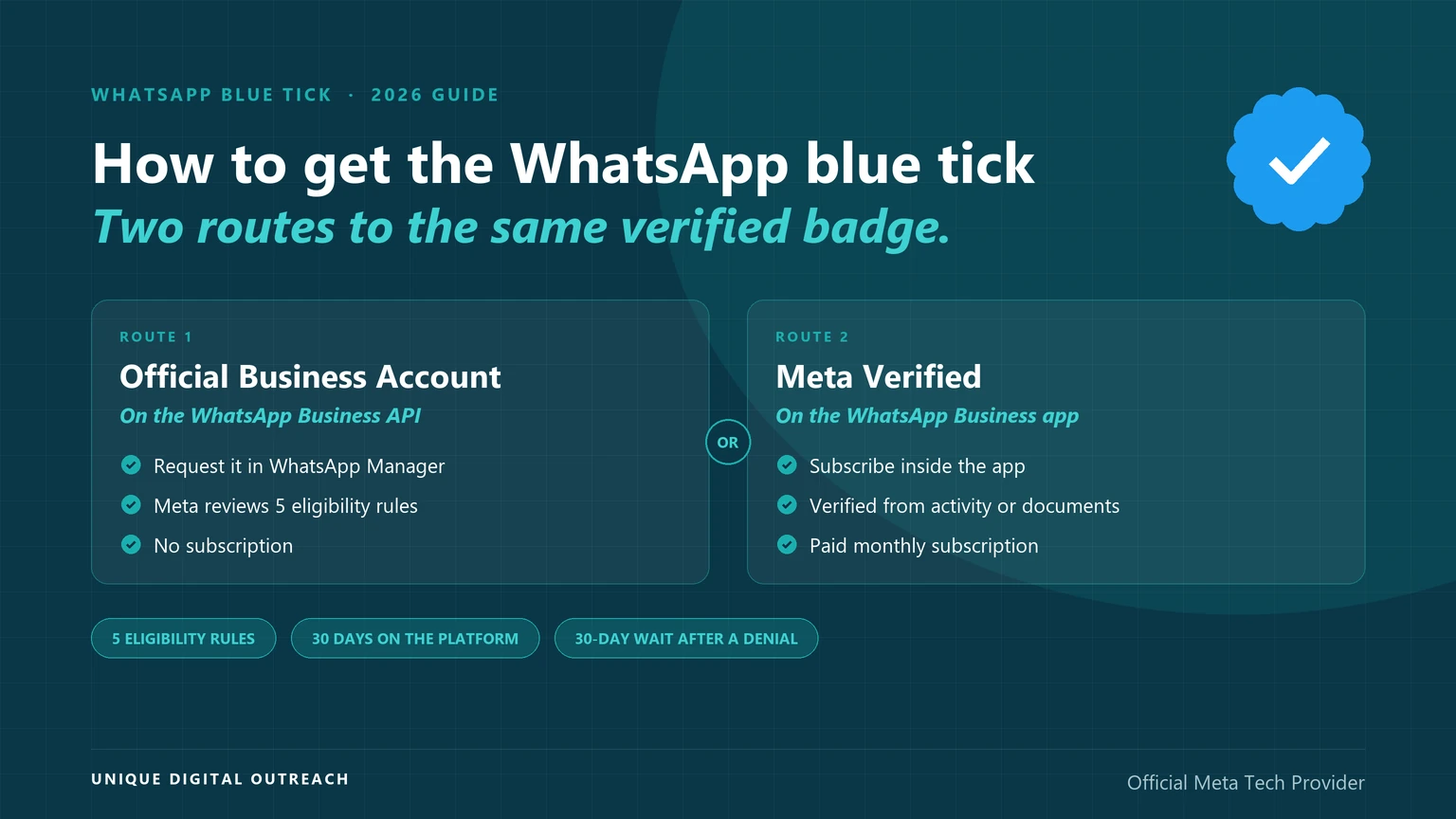
The WhatsApp blue tick is a blue checkmark next to a business’s name that shows Meta has verified the account. On the WhatsApp Business API it comes with Official Business Account status, which Meta grants on request to numbers that meet five eligibility rules. On the WhatsApp Business app it comes with Meta Verified, a paid monthly subscription.
Older guides, including some of ours, call it the green tick. Meta’s documentation now describes a blue checkmark, so this guide uses the current name.
How this guide was checked: every eligibility rule, step and outcome below comes from Meta’s developer documentation and WhatsApp’s Help Center, read on 15 September 2026, and each section names its source.
How do you get the WhatsApp blue tick?
Put your number on the WhatsApp Business API, meet Meta’s five eligibility rules, then request Official Business Account status in WhatsApp Manager. UDO helps eligible businesses through each step.
Eligible to apply = policy compliance + 30 days on the platform + verified business portfolio + two-step verification + approved display name
- Policy compliance: the business follows the WhatsApp Business Messaging Policy.
- 30 days on the platform: the number has been registered on the WhatsApp Business Platform for at least 30 days.
- Business Verification: the business portfolio that owns the number has passed Meta’s Business Verification.
- Two-step verification: it is switched on for the business phone number.
- Approved display name: Meta has approved the name shown on the number.
- 5 rules: the eligibility criteria Meta lists for Official Business Account status.
- 30 days: the minimum time a number must be registered on the WhatsApp Business Platform before it is eligible.
- 30 days: the wait before you can request again after Meta rejects a request.
- 2 routes: Official Business Account status for API numbers, or Meta Verified for WhatsApp Business app numbers.
Sources: Meta for Developers, Official Business Accounts (updated 21 May 2026); WhatsApp Help Center, About verified business accounts.
What is the WhatsApp blue tick?
The WhatsApp blue tick is a verified badge — a blue checkmark beside a business’s name — that tells customers Meta has verified the account, based on its activity across Meta technologies or on information and documents the business provided.
According to WhatsApp’s Help Center, some verified accounts belong to a notable person, brand or entity, while others subscribe to one of Meta’s paid products such as Meta Verified. Either way the customer sees the same blue badge; what differs is how the business earned it.
Which blue tick route fits your business?
If your number runs on the WhatsApp Business API, the route to the WhatsApp blue tick is Official Business Account status; if it runs on the WhatsApp Business app, the route is a Meta Verified subscription, where Meta offers it to your account.
| Official Business Account | Meta Verified | |
|---|---|---|
| Where it applies | A number on the WhatsApp Business API | A number on the WhatsApp Business app |
| How you get it | Request it in WhatsApp Manager or through the API; Meta reviews it | Subscribe inside the WhatsApp Business app and complete Meta’s verification |
| Cost | Meta’s documentation lists no fee for the request | A paid monthly subscription |
| What it checks | Five eligibility rules, including Business Verification | Activity across Meta technologies, or information and documents you provide |
| Not available to | WhatsApp Business app numbers, test accounts and business employees | Accounts where Meta has not yet offered it |
| If Meta says no | Wait 30 days, then request again | If the option is missing, it is not available to you yet |
Sources: Meta’s Official Business Accounts documentation and WhatsApp’s Help Center articles on verified business accounts and Meta Verified, read on 15 September 2026.
For a business that sends campaigns, alerts or support messages at scale, the API route is the one that matters, because the API is where that messaging runs. Our guide to the WhatsApp Business app vs the API explains the difference in detail.
What are the eligibility rules for the WhatsApp blue tick?
Meta’s eligibility rules for the WhatsApp blue tick on the API are five: follow the WhatsApp Business Messaging Policy, be registered on the platform for 30 days, verify your business portfolio, turn on two-step verification and have an approved display name.
Meeting all five makes a number eligible to request Official Business Account status. It does not make approval automatic: Meta still reviews each request.
- WhatsApp Business Messaging Policy. The business must comply with WhatsApp’s Business Messaging Policy, which covers what you may send and to whom.
- 30 days on the WhatsApp Business Platform. A number registered last week cannot apply yet, however well known the brand.
- Business Verification. The business portfolio that owns the number must pass Meta’s Business Verification, Meta’s process for confirming the business behind the account.
- Two-step verification. The business phone number must have two-step verification switched on.
- Approved display name. The name customers see on the number must have been approved by Meta.
Source: Meta for Developers, Official Business Accounts — Eligibility (updated 21 May 2026).
Meta also says that if you meet all five but cannot see the option to apply in WhatsApp Manager, you should ask your Meta point of contact, your solution provider’s support team or Meta Support to check your eligibility.
How do you apply for WhatsApp blue tick verification?
You apply for WhatsApp blue tick verification in seven steps: get your number on the WhatsApp Business API, verify your business portfolio, get the display name approved, turn on two-step verification, wait out the 30 days, submit the request in WhatsApp Manager, and watch for Meta’s decision.
- Get your number on the WhatsApp Business API.Official Business Account status is not granted to WhatsApp Business app numbers, so the number has to be on the API first.
- Complete Business Verification for your business portfolio.This is Meta’s process for confirming the business behind the account.
- Get your display name approved.The name shown on the number must be approved by Meta before you apply.
- Turn on two-step verification for the number.Enable it on the number in WhatsApp Manager if it is not on already.
- Wait until the number has been on the platform for 30 days.Send within the Business Messaging Policy in that time, since compliance is one of the five rules.
- Submit the request in WhatsApp Manager.Go to WhatsApp Manager > Overview, click the number, then use Submit Request under Phone numbers > Profile > Official business account.
- Watch for Meta’s decision.Meta sends a notification once the request is reviewed; developers can also read the status from the number’s
official_business_accountfield in the API.
Source: Meta for Developers, Official Business Accounts — Requesting OBA status via WhatsApp Manager.
Why do WhatsApp blue tick requests get rejected?
A WhatsApp blue tick request is rejected when Meta’s review decides the number does not meet the eligibility requirements at that time, and you must then wait 30 days before requesting again.
Use the 30 days to check every rule against your account before you apply a second time.
- The number is too new. It has been registered on the WhatsApp Business Platform for less than 30 days.
- Business Verification is incomplete. The business portfolio that owns the number has not passed verification.
- Two-step verification is off. It must be enabled on the business phone number itself.
- The display name is not approved. A pending or rejected display name blocks the request.
- Policy problems. Messaging that breaks the WhatsApp Business Messaging Policy counts against the first rule.
- The wrong kind of number. WhatsApp Business app numbers, test accounts and business employees’ numbers are not granted the status.
Source: Meta for Developers, Official Business Accounts — Denied requests and eligibility.
A rejection does not stop you from presenting your business well in the meantime. Every business phone number has a profile — picture, email, website and description — that you can edit at any time. Our guide to WhatsApp Business API approval and rejection reasons covers the account-level checks that come before this one.
What changes once your business has the blue tick?
Once your business has the WhatsApp blue tick, customers see a blue checkmark beside your name, and on the API your number can appear when people search for it in WhatsApp even if they have not saved it as a contact.
- A visible badge. Official Business Account numbers show a blue checkmark beside their name in the contacts view.
- Easier to find. Meta’s documentation says numbers without Official Business Account status do not appear in WhatsApp search results unless the customer has saved the number, which is why Meta recommends applying.
- More confidence for customers. WhatsApp’s Help Center describes the verified badge as a way to show customers they are chatting with the right business.
- Extra features with Meta Verified. The subscription adds account support and impersonation protection on top of the badge.
Sources: Meta for Developers, Official Business Accounts; WhatsApp Help Center, About verified business accounts.
What the blue tick does not do is unlock sending. Because a number must already have been registered on the WhatsApp Business Platform for 30 days before it can apply, every business that gets the tick was sending messages without it first.
Can you buy the WhatsApp blue tick?
You cannot buy Official Business Account status — Meta reviews each request against its eligibility rules — but Meta Verified, the other route to the WhatsApp blue tick, is a paid subscription sold by Meta itself inside the WhatsApp Business app.
Treat any “blue tick verification service” that sells the badge or promises one as a warning sign. A provider such as UDO can prepare your account and submit the request with you, but the decision is Meta’s.
How does UDO help you get the WhatsApp blue tick?
UDO helps you get the WhatsApp blue tick by putting your number on the official WhatsApp Business API, handling the onboarding steps Meta checks, and assisting eligible businesses when they apply to Meta for verification.
- Official Meta Tech Provider. Your number goes on the official WhatsApp Business API, the route Official Business Account status requires.
- Onboarding handled. UDO’s team handles the setup of your Meta business account, phone number verification and your first template approvals.
- Verification assistance. UDO assists eligible businesses in applying to Meta for the verified badge.
- Dedicated account management. One team to go back to when Meta asks for more information.
- No setup fee and no subscription. You pay per delivered message; rates are on our pricing page.
Get your number ready for the blue tick
Frequently asked questions
A business gets the blue tick on WhatsApp through Official Business Account status on the WhatsApp Business API, or through a Meta Verified subscription on the WhatsApp Business app. For the API route, the number needs 30 days on the platform, a verified business portfolio, two-step verification, an approved display name and policy compliance before you request it in WhatsApp Manager.
Request Official Business Account status for the number in WhatsApp Manager, under Phone numbers > Profile > Official business account, once it meets Meta’s five eligibility rules. Meta reviews the request and notifies you of the decision; if it is rejected, you can request again after 30 days.
Only through Meta Verified. Official Business Account status is not granted to WhatsApp Business app numbers, but Meta Verified, a paid monthly subscription, adds the verified badge in the app where Meta offers it. To check, open Settings or Business Tools in the app and look for Meta Verified; if it is not there, it is not available to you yet.
Requesting the WhatsApp blue tick as an Official Business Account carries no fee in Meta’s documentation, although the number itself must be on the WhatsApp Business API, where messages are charged. Meta Verified on the WhatsApp Business app is a paid monthly subscription.
They refer to the same idea: a badge showing Meta has verified a business. Older guides call it the green tick, while Meta’s documentation now describes a blue checkmark for Official Business Accounts. Our green tick guide covers the verified business account from that angle.
A business gets verified on WhatsApp by earning the blue tick: Official Business Account status for a number on the WhatsApp Business API, or a Meta Verified subscription for a number on the WhatsApp Business app. On the API, verification also depends on Meta’s Business Verification of the business portfolio that owns the number.
At least 30 days on the API route, because a number must be registered on the WhatsApp Business Platform for 30 days before it can request Official Business Account status. Meta’s documentation does not publish a review time after that; if a request is rejected, the next one can be made 30 days later.
No. You can send messages on the WhatsApp Business API without the WhatsApp blue tick; in fact a number must be registered on the platform for 30 days before it can even apply. The tick adds a verified badge and search visibility, not the ability to send.
A rejection means Meta decided the number does not meet the eligibility requirements at that time. You must wait 30 days before requesting again, and you can keep editing your business profile — picture, email, website and description — in the meantime.
An Official Business Account is a status Meta grants on request to eligible numbers on the WhatsApp Business API, with no subscription. Meta Verified is a paid monthly subscription on the WhatsApp Business app that adds the verified badge along with account support and impersonation protection. Both show customers a blue checkmark.
No one but Meta can grant it. Official Business Account status is decided by Meta’s review, and Meta Verified is sold by Meta inside the WhatsApp Business app. A provider can prepare your account and submit the request with you, but a third party that sells the tick itself is a warning sign.
Sources — all read on 15 September 2026.
- Meta for Developers, Official Business Accounts (updated 21 May 2026): eligibility criteria, the request steps in WhatsApp Manager, numbers not granted the status, the 30-day wait after a denial and search visibility.
- WhatsApp Help Center, About verified business accounts: what the verified badge means, notable accounts and Meta Verified as a paid monthly subscription.
- WhatsApp Help Center, About Meta Verified for Business on WhatsApp: availability in the WhatsApp Business app.
- Meta Business Help Center, Business Verification, and WhatsApp Business Messaging Policy.
- Unique Digital Outreach, WhatsApp Business API page: the UDO services described in this article.