An automated voice call is a phone call that plays a recorded message, placed by software rather than by a person, to thousands of customers at a time. Businesses use them for payment reminders, delivery alerts, event announcements and one-time passwords, because a ringing phone reaches customers who have no internet and never open an app.
How this guide was checked: India’s rules below come from TRAI’s commercial communication regulations as amended in February 2025, read on 16 September 2026, and the UDO features come from our own voice page. Each section names its source.
What is an automated voice call?
An automated voice call plays a recorded message to a list of numbers, dialled by an outbound dialer instead of an agent. UDO runs these campaigns with scheduling, retries, regional-language audio and a REST API.
Contact list + recorded audio + outbound dialer → calls placed and retried → a report of who answered
- A contact list: the numbers to call, usually uploaded as a CSV.
- A recorded message: your own audio, in the language your customers speak.
- An outbound dialer: the platform that places the calls, at the time you choose.
- Prior intimation to your operator: TRAI requires senders to declare the use of auto dialers or robo-calls in advance.
- A call report: who answered, who was busy, and which numbers to retry.
- 140 series: the number series through which promotional calls are permitted in India.
- 1600 series: numbers allotted for transactional and service calls.
- 30 minutes: a transactional call must follow the customer’s own transaction within this window.
- 20 calls a day: the usage cap an operator can place on an unregistered sender caught sending unsolicited calls.
- 15 days: how long an operator bars outgoing services on a first confirmed violation by an unregistered sender.
Source: TRAI, Telecom Commercial Communications Customer Preference (Second Amendment) Regulations, 2025.
What is voice broadcasting, and how is it different from a call centre?
Voice broadcasting is the same thing as an automated voice call campaign: one recorded message sent to many numbers at once, with no agent on the line, while a call centre puts a person on every call.
That difference decides what each is good for. A call centre handles conversations, negotiation and support. Automated voice calls handle the one-way announcements a business repeats thousands of times: your EMI is due, your delivery is on the way, your code is 4821.
Auto dialer vs voice broadcasting: what is the difference?
An auto dialer is software that places calls automatically, and voice broadcasting is one way to use it — playing a recorded message rather than connecting the call to an agent.
| Type | What happens on the call | Best for |
|---|---|---|
| Voice broadcast | A recorded message plays; nobody is waiting on the line | Reminders, alerts, announcements, voice OTP |
| Automated IVR flow | A recorded message plays and the customer answers with the keypad | Confirmations and simple choices inside a campaign |
| Agent dialer | Software dials, then connects the answered call to a person | Sales and support teams with agents on shift |
Agent dialling is a call-centre product, and a different thing to buy.
UDO’s voice product covers the first two — automated outbound campaigns and IVR flows — as listed under Voice Outbound on our pricing page.
How does an automated voice call campaign work?
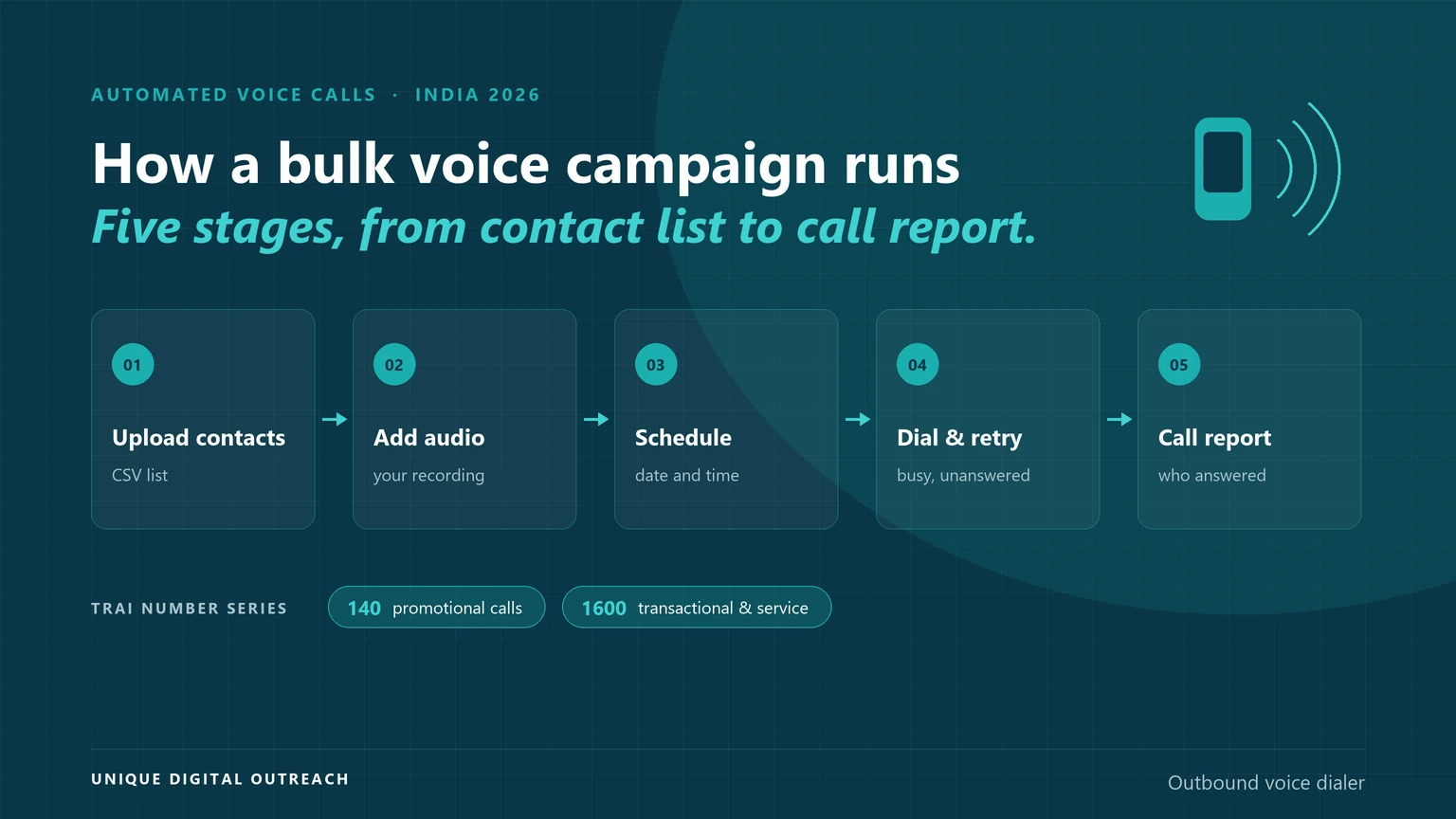
An automated voice call campaign runs in five stages: upload your contacts, add your recorded message, schedule the campaign, let the dialer place and retry the calls, then read the call report.
| Stage | What happens | What goes wrong here |
|---|---|---|
| Upload contacts | The numbers are added in bulk, usually from a CSV file | Wrongly formatted numbers, or a list you have no consent to call |
| Add audio | You upload your own recording, in the language your customers speak | A message too long to hold attention, or in the wrong language |
| Schedule | The campaign is set to run at a chosen date and time | Calling at a time customers will not answer |
| Dial and retry | The dialer places the calls and retries busy or unanswered numbers at set intervals | Retrying so often that customers complain |
| Call report | Connected calls, failures, duration and delivery status arrive in your dashboard | Nobody reads it, so the same numbers fail next month |
Campaigns can also be triggered from your own systems, so a call can follow an order, a due date or a failed SMS.
Source: Unique Digital Outreach, Outbound Voice Dialer — bulk upload, recorded messages, scheduling, retries, live reports and the REST API.
What are the rules for automated voice calls in India?
Before you use an auto dialer or robo-calls in India, TRAI’s regulations require you to notify your operator in advance, in writing, along with what the calls are for.
The rest of the rules mirror SMS: your calls are checked against customer preferences, and the number series you call from depends on the type of call.
- Declare the auto dialer. Every sender must notify the originating operator in advance about the use of auto dialers or robo-calls, and the intended objective of those calls.
- Promotional calls: 140 series. TRAI’s explanatory note states promotional calls should be permitted only through 140-series numbers.
- Transactional and service calls: 1600 series. These numbers were allotted for transactional and service calls, so customers can tell them apart.
- The categories match SMS. Promotional, service, transactional and government calls are defined the same way as messages, and a transactional call must answer a customer-initiated transaction within 30 minutes.
- Preferences are enforced. Calls are scrubbed against customers’ registered preferences, and operators must detect misuse of robotic calls, auto dialers and pre-recorded announcements.
- Unregistered senders are capped. An operator can limit an unregistered sender to 20 outgoing calls a day, and disconnect the resources for repeat violations.
Source: TRAI, Second Amendment Regulations, 2025 — regulation 4 (auto dialer intimation), regulation 2 (call categories), regulation 22 and Schedule-II (detection of robotic calls), and the explanatory memorandum on 140 and 1600 series numbers.
The safest route is the same as for SMS: send from a registered sender, keep your consent records, and keep promotional and transactional traffic apart. Our DLT registration guide covers the registration side in detail.
When is a voice call better than SMS or WhatsApp?
A voice call is the better channel when the customer has no internet, does not use apps, or must act on something urgent — and when you need the message to interrupt rather than wait in an inbox.
| Automated voice | SMS | ||
|---|---|---|---|
| Needs internet | No | No | Yes |
| Works on feature phones | Yes | Yes | No |
| Message format | Your recorded voice, in any language | Text, 160 characters per SMS | Text, media, buttons |
| Two-way conversation | No, beyond keypad replies | Limited | Yes |
| Typical use | Reminders, alerts, voice OTP, announcements | OTPs, order updates, campaigns | Support, catalogues, rich campaigns |
Many businesses use voice as the backstop: when an SMS OTP does not arrive, the same code is read out over a call.
A bulk voice call campaign is often run alongside SMS rather than instead of it — see our guide to SMS delivery rates for the text side.
How are automated voice calls charged?
Automated voice calls are charged by how long each call actually runs, not by the minute, so a short reminder costs less than a long recording. UDO publishes its voice rates under Voice Outbound on the pricing page.
Campaign cost = connected calls × how long each call runs × your voice rate
- Keep the message short. Every extra second of recording is charged on every call you place.
- Watch the retries. Every reconnected call is billed again, so choose the retry interval with the cost in mind.
- Check what is billed. Ask any provider whether unanswered calls are charged, and in what unit talk time is counted.
UDO’s voice rates are published on our pricing page, under Voice Outbound, with no setup fee and no subscription.
Why run automated voice calls with UDO?
Run automated voice calls with UDO because the outbound dialer covers the whole campaign — bulk upload, your own audio, scheduling, retries and live reports — and can be triggered from your systems through a REST API.
- Bulk contact upload. Thousands of numbers from a CSV, with the campaign live within minutes of setup.
- Your own recordings. Upload audio in Hindi, Tamil, Telugu, Marathi, Bengali or any regional language.
- Voice OTP. One-time passwords read out over a call, for customers whose SMS does not arrive.
- Scheduling and retries. Set the time the campaign runs, and retry busy or unanswered numbers at intervals you control.
- Live call reports. Connected calls, failed attempts, duration and status as the campaign runs.
- REST API. Trigger calls from your CRM, website or backend, the same way you trigger an SMS.
- Billed on talk time. You pay for the seconds used rather than a full minute, with no setup fee and no subscription. Rates sit under Voice Outbound on the pricing page.
Put your next reminder in a phone call
Frequently asked questions
An auto dialer is software that places phone calls from a list automatically, without anyone dialling. In a voice broadcast it plays a recorded message to whoever answers; in a call centre it connects the answered call to an agent. UDO’s outbound dialer does the first.
Yes, in business use they mean the same thing: software that places calls automatically instead of someone dialling each number. Consumer apps also use “auto caller” for automatic redialling on a phone, which is a different, personal tool.
Yes, for registered senders following TRAI’s rules. You must notify your operator in advance that you are using an auto dialer or robo-calls and what the calls are for, send promotional calls from the 140 series and transactional or service calls from the 1600 series, and respect customers’ registered preferences. Unregistered senders can be capped at 20 calls a day and disconnected for repeat violations.
Voice broadcasting is sending one recorded message to many phone numbers at once as automated calls. It suits announcements, reminders and alerts, where the customer needs to hear something rather than reply to it.
Yes. A voice OTP reads the code aloud over a call, which is how many businesses reach customers whose SMS did not arrive. UDO offers voice OTP inside the same dialer, and our OTP authentication service can fall back to a call when an SMS fails.
There is no single published limit for registered senders; throughput depends on your provider’s capacity and the routes in use. What is capped is misuse: an operator can limit an unregistered sender to 20 outgoing calls a day, and disconnect its telecom resources for repeat violations.
For promotional calls, yes: they reach only customers who have not blocked that category or who have given consent, and your calls are scrubbed against those preferences. Transactional calls answer a customer’s own transaction within 30 minutes, and service calls carry information about a product or service the customer already uses.
A voice broadcast plays a recorded message and ends; an automated IVR flow plays the message and lets the customer answer with the keypad, for example to confirm a delivery. UDO’s pricing page lists automated IVR alongside outbound campaigns and voice OTP.
Any language your customers speak: you upload your own audio. UDO lists Hindi, Tamil, Telugu, Marathi and Bengali among the regional languages businesses use, and a single campaign can be split by language across different lists.
The call report tells you. UDO’s dashboard shows connected calls, failed attempts, call duration and delivery status while the campaign runs, and unanswered or busy numbers can be retried automatically at intervals you set.
Sources — all read on 16 September 2026.
- Telecom Regulatory Authority of India, Telecom Commercial Communications Customer Preference (Second Amendment) Regulations, 2025, dated 12 February 2025: regulation 4 (advance intimation for auto dialers and robo-calls), regulation 2 (promotional, service, transactional and government call definitions), regulation 22 and Schedule-II (detecting misuse of robotic and auto dialer calls), regulation 25 (action against unregistered senders, including the 20-call usage cap), and the explanatory memorandum on 140 and 1600 series numbers.
- Unique Digital Outreach, Outbound Voice Dialer: bulk upload, recorded messages, voice OTP, scheduling, retries, regional languages, live reports and a REST API.
- Unique Digital Outreach, pricing page: the Voice Outbound rates, automated IVR, and the no-setup-fee, no-subscription terms.